How to Get More Google Reviews Without Breaking the Rules
A practical way to get more genuine Google reviews: the official review link and QR code, when and how to ask, what Google bans, and the fake-review laws in the US and UK.

Reviews are one of the first things people check before they call a business, book an appointment or visit a shop. They also help your Google Business Profile show up in local searches. So it is no surprise that many business owners want more of them, fast.
The problem is that some of the most common tricks, like offering a discount for a five-star review or only asking happy customers, now break Google's rules and, in some countries, the law. This guide shows how to get a steady flow of genuine reviews the right way, and what to avoid so your hard-earned reviews are not removed.
In this article
Why reviews matter so much
For local businesses, reviews do two jobs at once. They help customers choose between you and the business next door, and they are one of the signals Google uses when deciding which businesses to show in the map results. A profile with a good number of recent, detailed reviews looks active and trustworthy; one with three reviews from two years ago does not.
What matters is not just the star rating but the steady flow. A few new reviews every month is far better than a burst of twenty and then nothing for a year.
Make it easy: use Google's own review link and QR code
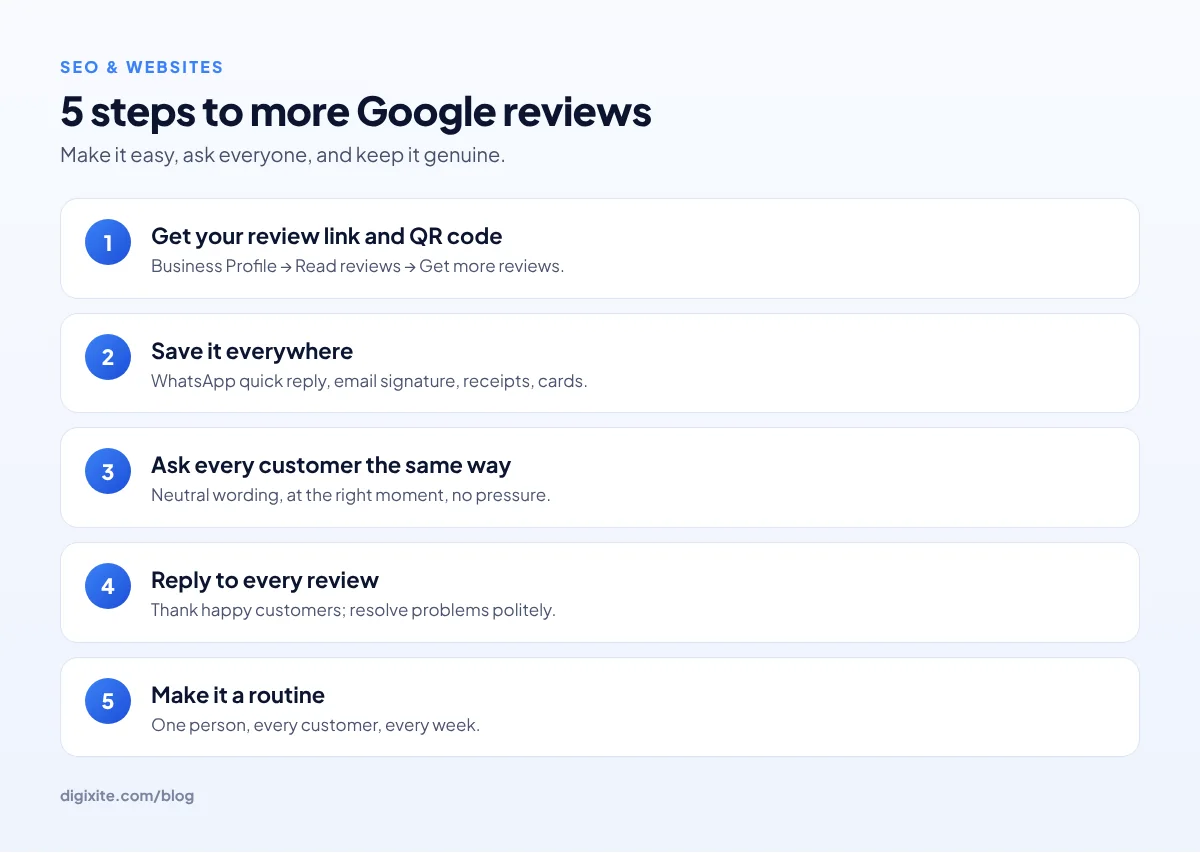
Most customers who mean to leave a review never get round to it because finding the review box takes too many taps. Google gives every Business Profile a direct link and a QR code that open the review form immediately. According to Google's help page on review links, you find them like this:
- Go to your Business Profile (search your business name on Google while signed in).
- Select Read reviews, then Get more reviews.
- Select Copy to copy the link, or save the QR code image.
Generate the QR code on a computer, as it may not appear in the mobile app. Then save the link as a quick reply in WhatsApp Business, add it to your email signature, and print the QR code on cards, receipts or packaging.
When and how to ask
Ask everyone, in the same neutral way
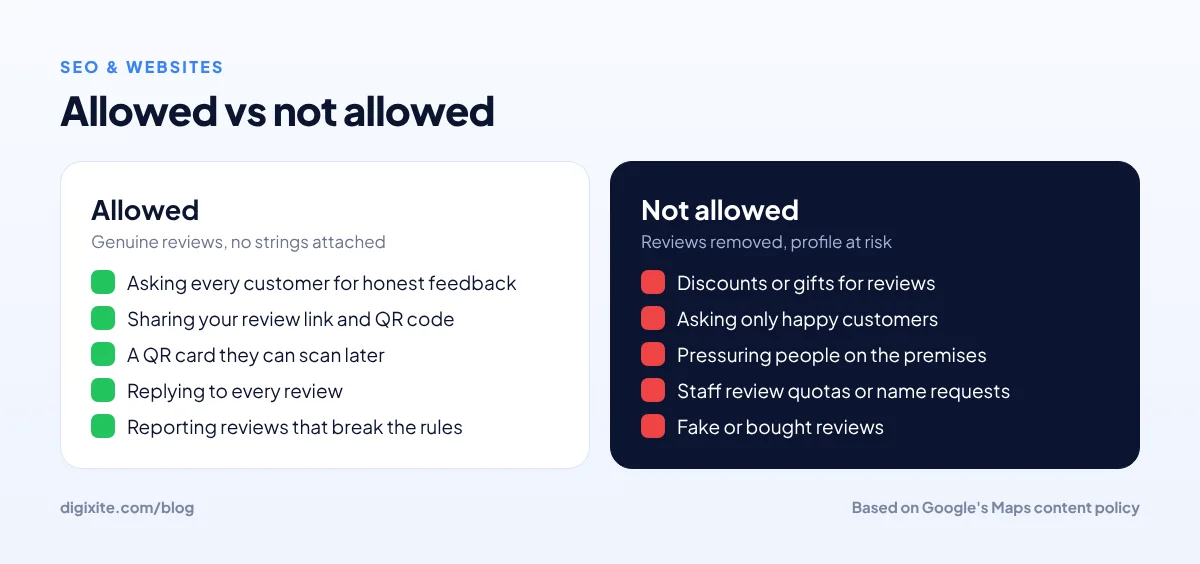
Google's rules require that you do not cherry-pick. Ask all your customers, not only the ones you think are happy, and use neutral wording such as "We'd really appreciate your honest feedback on Google." Avoid "Please give us five stars".
Pick the right moment
- Service businesses: send the link by WhatsApp or email shortly after the job is finished.
- Online stores: ask a few days after delivery, once the customer has used the product.
- Clinics and salons: follow up the same day with a short thank-you message and the link.
- Shops and restaurants: a QR code card with the bill or at the counter lets people review later, in their own time.
Do not pressure people on the spot
Google's policy says businesses should not require or pressure customers to leave a review while they are still on the premises. A card they can scan later is fine; standing over someone until they post is not.
A simple message you can use
"Hi [name], thank you for choosing [business]. If you have a minute, we'd really appreciate your honest feedback on Google. It helps other customers and helps us improve: [review link]"
Send it once, and perhaps one gentle reminder. More than that becomes annoying.
Tip: Ask customers to mention what you did for them, in their own words, if they are happy to. You can say "it helps if you mention the service you used", but do not tell them what to write or ask them to name a staff member.
What Google does not allow
Google's prohibited and restricted content policy for Maps reviews is clear, and it has been tightened in recent years. Businesses must not:
- Offer incentives such as payment, discounts, free products or services in exchange for a review, or for changing or removing a negative review.
- Discourage negative reviews or only ask happy customers, a practice often called "review gating", for example sending unhappy customers to a private form and happy ones to Google.
- Pressure customers to review on the premises or ask them to include specific content.
- Set staff quotas for a number of reviews, or ask staff to get reviews that mention them by name. Google added these rules in 2026.
- Post fake reviews, whether written by you, your staff, friends, or bought from a seller, and never post negative reviews about a competitor.
Google removes reviews that break these rules and can restrict profiles that keep doing it. Losing dozens of reviews overnight is far more damaging than growing slowly.
It is also the law in some countries
Fake reviews are not only against Google's rules. In the United States, the Federal Trade Commission's rule banning fake reviews and testimonials took effect on 21 October 2024. It covers buying positive or negative reviews, undisclosed insider reviews and suppressing negative reviews through threats or intimidation, and it allows civil penalties for knowing violations.
In the United Kingdom, the Digital Markets, Competition and Consumers Act 2024 made fake reviews and concealed incentivised reviews a banned practice from 6 April 2025. The Competition and Markets Authority has published guidance and has written to businesses whose websites may not comply.
If you serve customers in the US or UK, or in any country with consumer protection rules, the safest approach is simple: only genuine reviews from real customers, with no strings attached. This is general information, not legal advice.
Reply to every review
Replying shows potential customers that you care, and it encourages more people to leave feedback.
- Positive reviews: thank the customer by name and mention something specific from their review.
- Negative reviews: stay calm and polite, apologise for their experience, and invite them to contact you directly to sort it out. Never argue in public, and never threaten.
- Reviews you believe are fake or break the rules: report them through your Business Profile instead of replying angrily.
Aim to reply within a day or two. Future customers often read your replies as closely as the reviews themselves.
Turn reviews into a routine
The businesses with the best reviews rarely run special campaigns. They simply ask every customer, every time, as part of their normal process. Assign one person to send the review link after each job or order, check new reviews twice a week and reply, and look at your total once a month.
If you are just getting started on Google, our Google Business Profile setup guide and local tips for Lahore businesses cover the rest of your profile.
Checklist
- Copy your review link and QR code from your Business Profile.
- Save the link as a WhatsApp quick reply and add it to emails and receipts.
- Ask every customer in the same neutral way, once, with one reminder at most.
- No discounts, gifts or payments for reviews, and no staff quotas.
- No filtering of unhappy customers away from Google.
- Reply to every review within a day or two.
- Report fake reviews instead of arguing with them.
Reviews are a big part of local SEO. If you would like help building a steady review routine alongside your website and search rankings, take a look at our SEO services; Digixite also offers a free website and SEO audit.